Redesigning MyFitnessPal's food tracking experience for better goal attainment and nutrition visibility.
Project Overview
Boosting the visibility of MyFitnessPal’s key features by 60% and reducing drop-off rates.
MyFitnessPal has long been a leader in fitness and nutrition tracking, but users today report mounting frustrations with core features like meal logging, nutrition goals, and its premium tools.
Over 3 months, our team conducted a thorough expert evaluation of MyFitnessPal using cognitive walkthroughs, competitive analysis, and various usability tests. By pairing qualitative insights with quantitative findings, I helped uncover where the experience breaks down and identified clear, actionable solutions focused on clarity, efficiency, and ease of use.
This redesign reduced task time, improved feature findability, and ultimately helped users build confidence and momentum within the app.
Duration
3 Months (Jan – Mar 2025)
Responsibilities
UX research, information architecture, wireframing, hi-fi prototyping, interaction design, usability testing.
Tools
Figma, Optimal Workshop, UserTesting.com
Collaborators
Kylie N., Hamin K., Justin G.,
Rebecca L., Mohammad S.
The problem
Leading in downloads, yet lagging in usability.
Tracking what you eat and how you progress should be easy, especially for users trying to build healthier habits.
Despite MyFitnessPal's popularity, many newcomers find the experience discouraging, as the app’s clunky experience turns simple tasks like meal logging or reviewing nutritional data into a challenge.
EXPERT EVALUATION: COGNITIVE WALKTHROUGH
The core tools work well, yet confusing flows and unclear navigation often overshadow their value.
We used a cognitive walkthrough to evaluate how easily new users could complete key tasks like logging meals and checking nutrition info.
While MyFitnessPal’s core functionality is present, we found that inconsistent navigation, unclear CTAs and labels, and cluttered visuals often caused confusion.
With small adjustments to flow and structure, these issues could be resolved, turning a frustrating experience into an intuitive one.
Takeaway #1
Inconsistent visuals and dense layouts make the interface harder to navigate and less visually appealing to users.
Takeaway #2
Data or graphs are hard to interpret, making it difficult for users to understand progress and stay motivated.
Takeaway #3
Overwhelming ads and unclear Premium upsells disrupt the experience and erode trust among free users.
THE MARKET LANDSCAPE: Competitive analysis
Falling behind while competitors continue to redefine the health and fitness space.
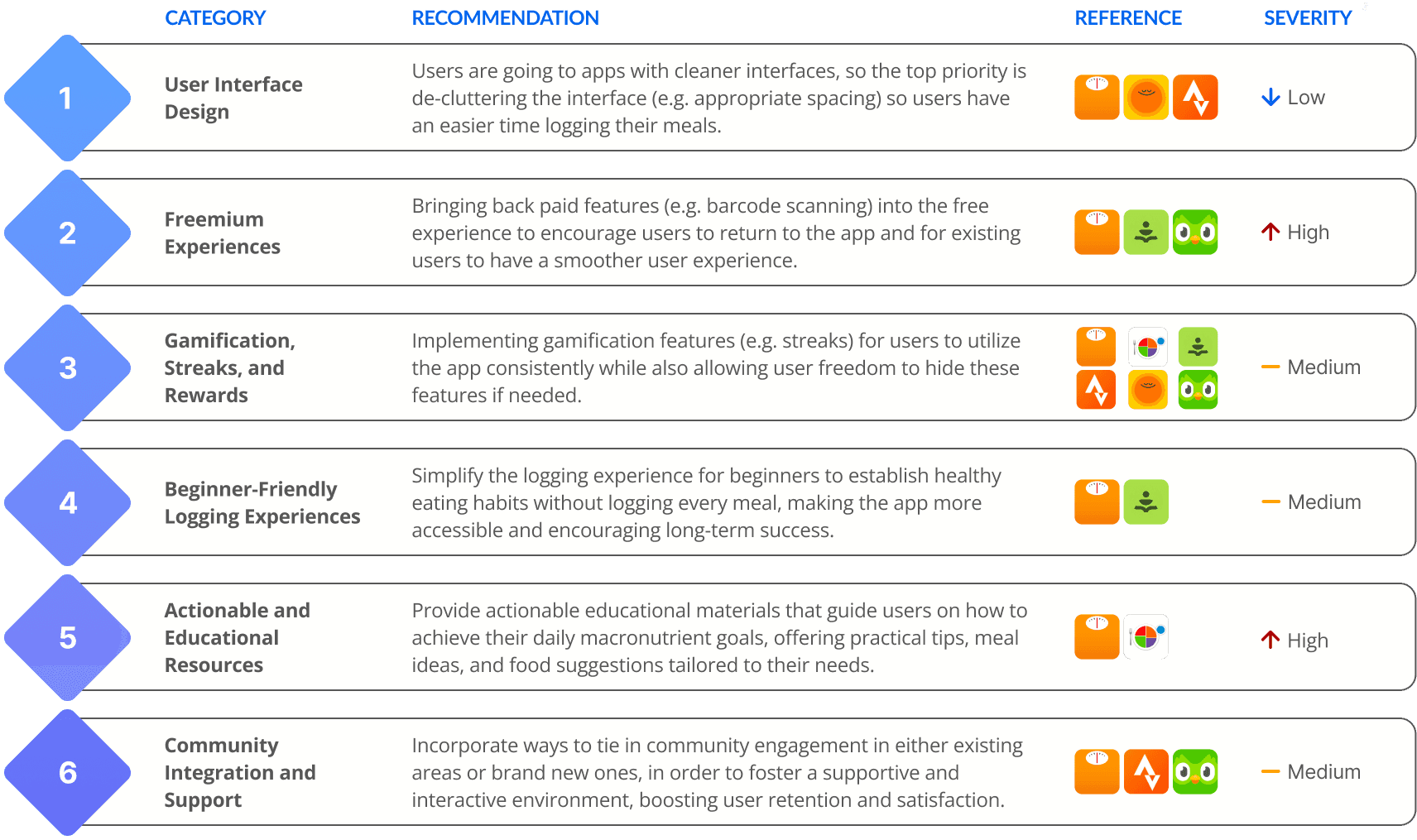
By evaluating top direct competitors like Lose It!, MyPlate, and Alma alongside indirect habit leaders such as Strava, Headspace, and influencers like Duolingo, we uncovered how effortless logging, clear progress feedback, and playful motivation drive user engagement.
Insights from these competitors played a key role in shaping our redesign strategy. The following table below shows which apps influenced which recommendations.
tREE TESTING
Over 40% of users failed to successfully utilize the main feature: logging a food item.
Through a tree test with 69 participants, we evaluated MyFitnessPal’s ability to support two essential tasks: logging a meal and checking macro goals. These breakdowns revealed fundamental flaws in the app’s navigation and information hierarchy, directly informing our final redesign that prioritized clarity, visibility, and task-focused flows.
TASK 1: LOCATE AND RECORD A SALAD FOR LUNCH
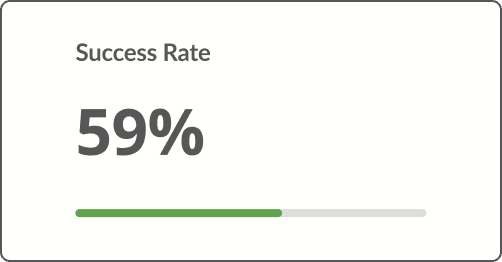
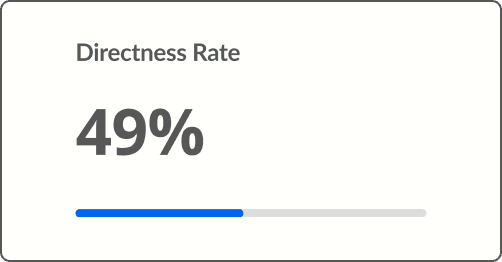
Just 59% of users were able to log a food item using search, and less than half did so directly. This suggests that cluttered results and duplicate or incorrect entries make meal selection overwhelming and reduce efficiency.
TASK 2: FIND WEEKLY PROTEIN INTAKE TO REVIEW GOALS
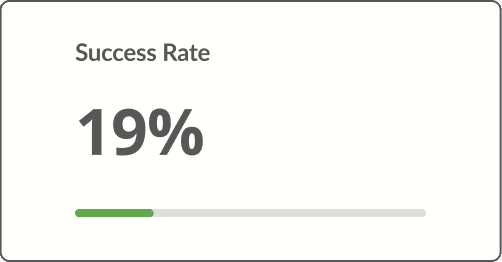
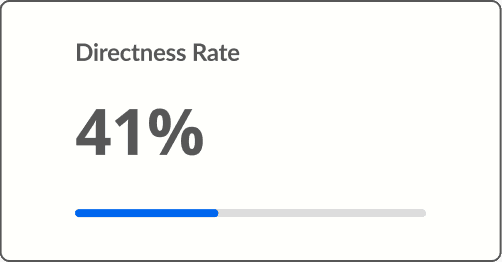
A mere 19% of users were able to successfully locate and view their nutrition goals. This indicates that when goals are not clearly surfaced, users struggle to connect logged meals to progress, making goals feel harder to achieve.
QUALITATIVE TESTING
"If I had not accidentally tapped on calories, I don't know if I would've found the [food's] nutrients section."
In an unmoderated think-aloud study with 15 participants, users were asked to log a meal and locate their nutrition intake goals. Their responses revealed key usability issues:
lOGGING IS TEDIOUS AND DEMOTIVATING
The current meal-logging process feels overwhelming, with one participant mentioning that they were unsure of which item to select due to numerous similar entries. Too many of these options lead to confusion, being overwhelmed, and guesswork.
finding intake and goals feels difficult
Users stumbled upon intake and goal info rather than following an intuitive flow. Others navigated to expected pages only to find missing data. One participant noted that they only located the nutrients section due to an unintentional interaction.
Premium Feature Value needs to be BETTER HIGHLIGHTED
Most users wanted faster food-logging tools and were curious about how they worked, but many felt these capabilities weren’t clearly distinguished as premium features, highlighting a need for MyFitnessPal to better communicate their value
"I wasn't too sure which creamy crisp was the one that I was looking for...so I kind of just had to guess and pick the best one."
Participant quote during a task to log a food entry
THE REDESIGN
Transforming meal logging, diary navigation, and premium trials
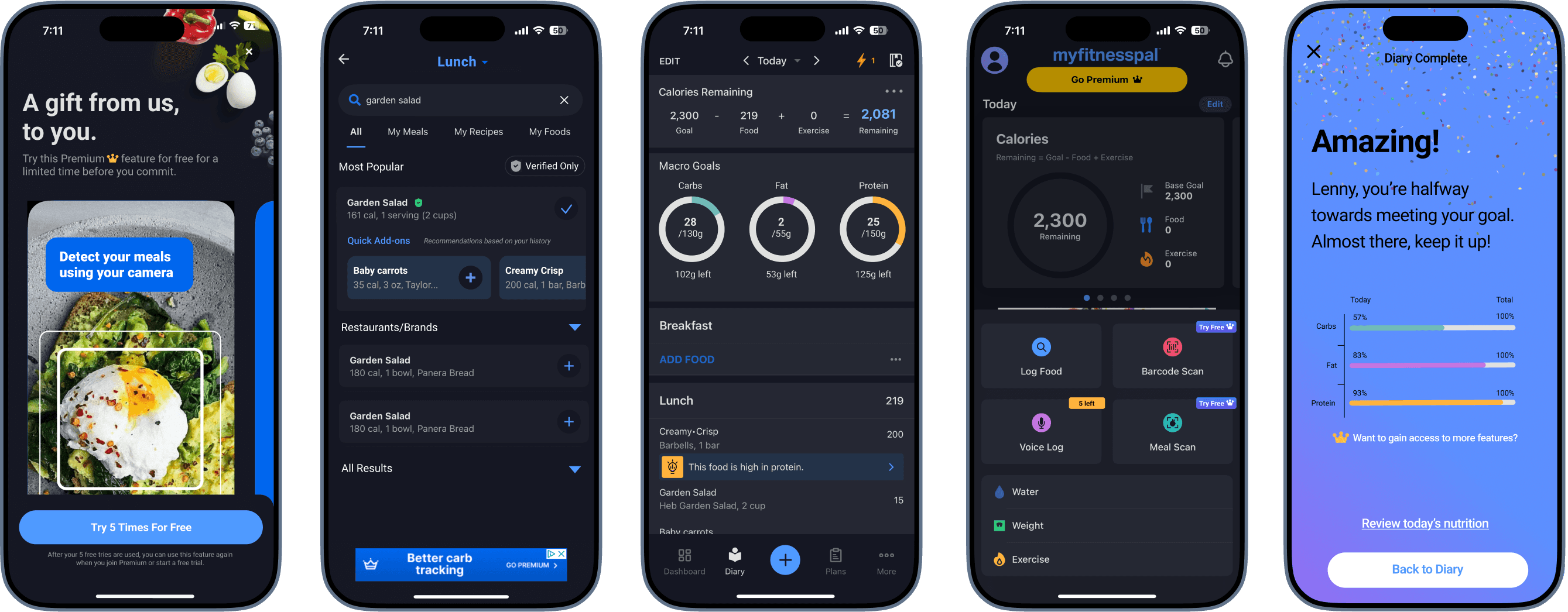
To address the confusion and friction uncovered in testing, I helped lead the redesign of three key areas: meal logging flow, diary organization, and premium feature trials.
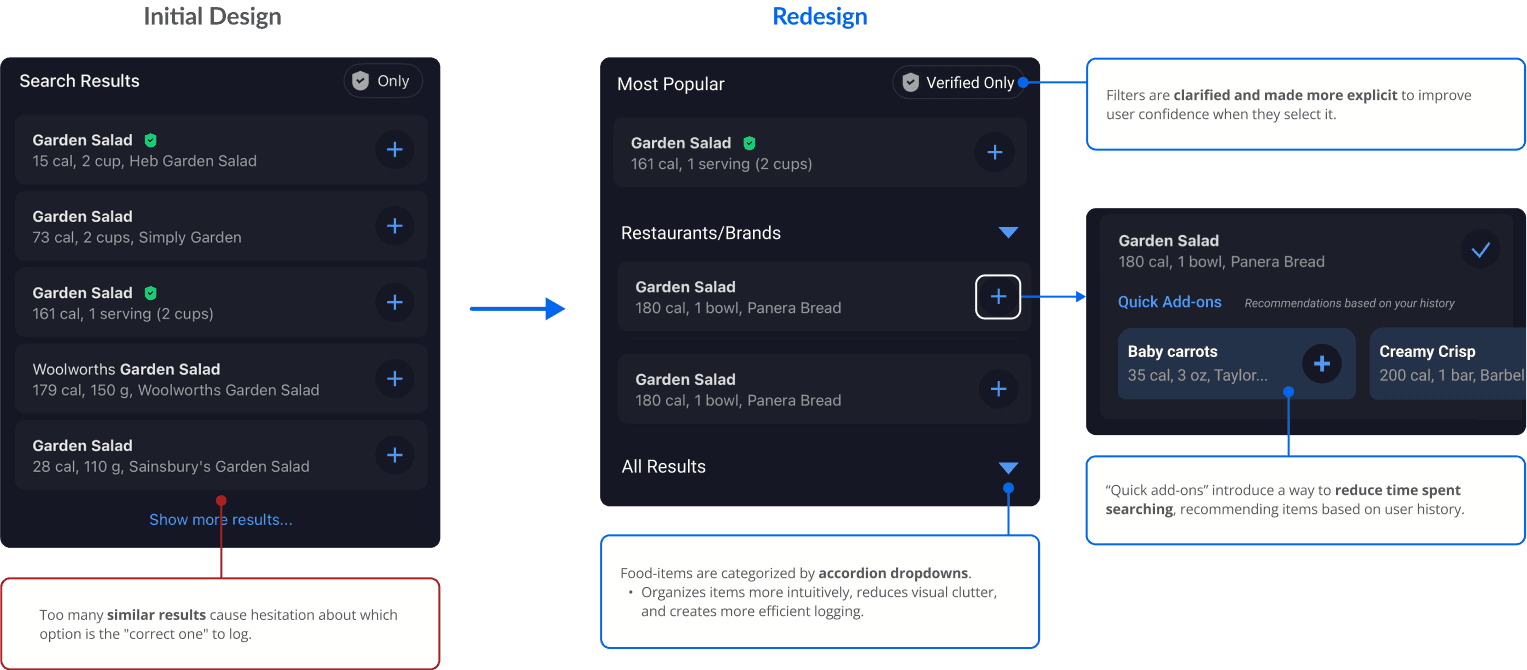
The updated logging flow reduced clutter by consolidating search results and introducing smart suggestions to help users log faster and with more confidence.
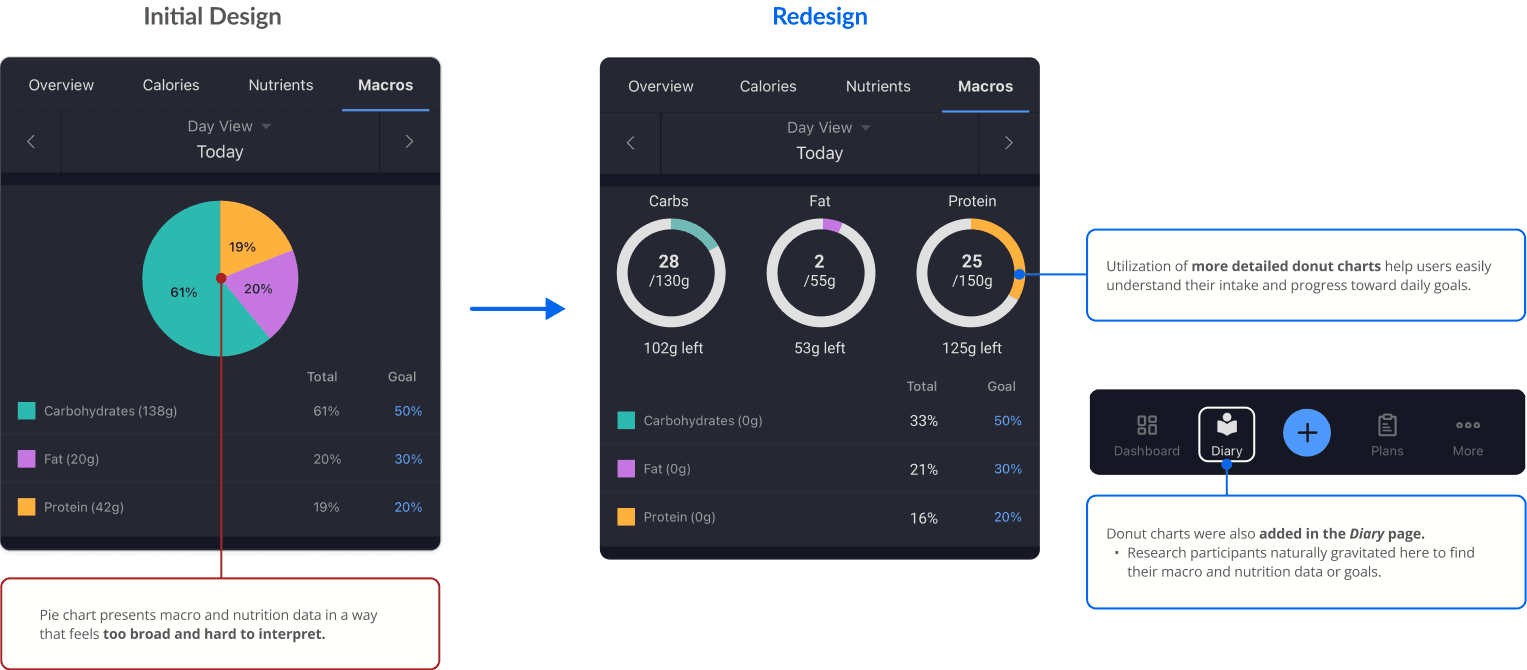
The diary was reorganized to surface nutrition goals clearly and reduce the need for guesswork.
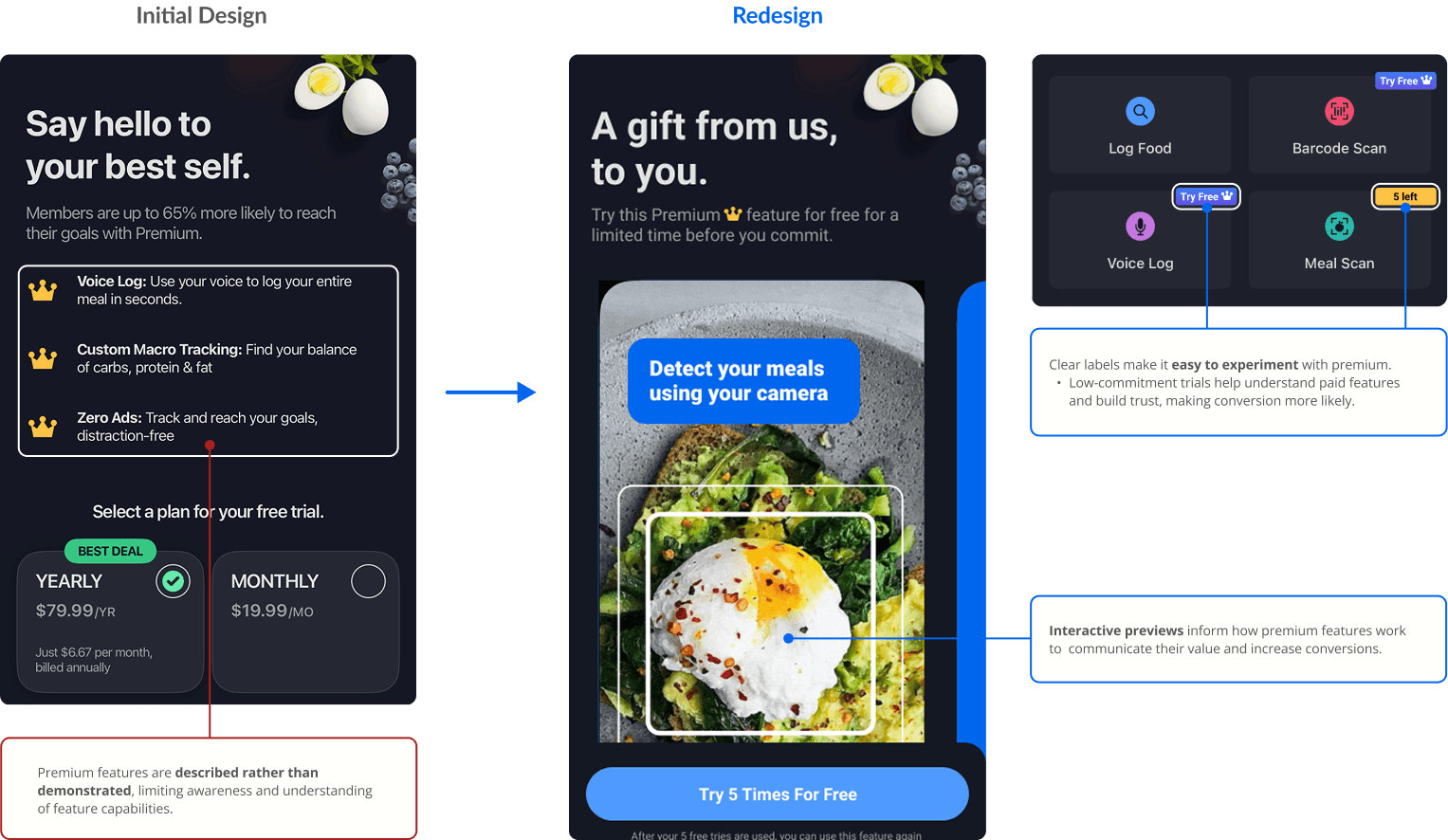
For Premium, I designed interactive previews that highlighted high-value features, like barcode scanning and quick-add meals, while making the upgrade path feel more transparent and optional, not pushy.
Simplifying food logging search results
Clarifying macro goals and nutrition data
Demonstrating premium feature potential
quantitative usability testing
Final tests yielded positive results with 39 participants logging meals 7 seconds faster
To validate the redesign directions informed by our tree testing and qualitative research, we conducted a final quantitative usability test to assess improvements in navigation clarity and task efficiency.
Overall, users completed the same tasks with higher success rates and reduced time on task compared to the initial testing phase.
7 Seconds Faster
(47s compared to 54s)
to log food, reflecting a smoother, more efficient experience and user flow
60% increase
(97% Compared to 37%)
to locate nutritional goals, showing the redesigned path was far more intuitive
92% Success Rate
to identify Premium features, indicating clearer visual cues and communication
INSIGHTS TO STRATEGY: FINAL RECOMMENDATIONS
How MyFitnessPal can maintain its position — and reclaim its edge
Meal Logging: Clear and Clean Up
Organize food search results using accordion-style categories (e.g., Most Popular, Restaurants, All), prioritize verified entries, and reduce duplicate results. Introduce smart suggestions based on logging history to minimize manual input and speed up logging.
Macro & Nutrition Data Transparency
Surface nutrition data directly within the Diary screen alongside the Nutrition page, using visual indicators like color-coded donut charts to make progress toward goals easier to understand at a glance.Premium Should Pull, Not Push
Shift from constant upselling to value-driven discovery by offering limited, interactive previews of Premium features (e.g., free uses of voice logging). Clear Free vs. Premium labeling helps reduce disruption while maintaining trust.
Project next steps include:
Conduct additional usability tests to validate our findings and uncover any overlooked pain points
Continue to ideate and iterate on redesigns informed by direct user feedback and testing
Reevaluate and redo our approach in assessing perceptions and implementation of Premium